
Apparent Wind Speed (AWS), Angle (AWA) Tool
Apparent Wind Speed / Angle: an Interactive Tool
What is Apparent Wind?
Every sailor learns quickly that there are two winds at play on a moving boat. The true wind (TWS / TWA) is what an observer floating still on the water would feel. The apparent wind (AWS / AWA) is what the boat and sails experience – the vector sum of the true wind and the wind created by the boat’s speed over the water.
Sails are powered by apparent wind, not true wind. The masthead fly, the telltales, the angle you trim to – all of it is governed by the apparent wind. On a fast catamaran, where boat speeds can rival or exceed true wind speed, the difference between the two can be big. A 15-knot breeze on a beam reach will feel like 21 knots from well forward of the beam, which is why multihull sailors can feel “overpowered” in conditions a monohull would find moderate.
This tool aims to make that relationship intuitive. Watch the apparent wind arrow swing, lengthen and shorten as the boat bears away from close-hauled to dead downwind – in real time, with numbers you can change.
Who it is for
- Catamaran owners and charterers wanting a guide to how their boat behaves on different points of sail.
- Instructors and students working through RYA, ASA or equivalent theory an interactive companion to the diagrams in the textbooks.
- Racers and cruisers planning passages who want to estimate the wind they’ll actually be sailing in, not just the wind on the GRIB file.
Why does a downwind run feels so much calmer than a reach in a strong breeze?
What the tool shows
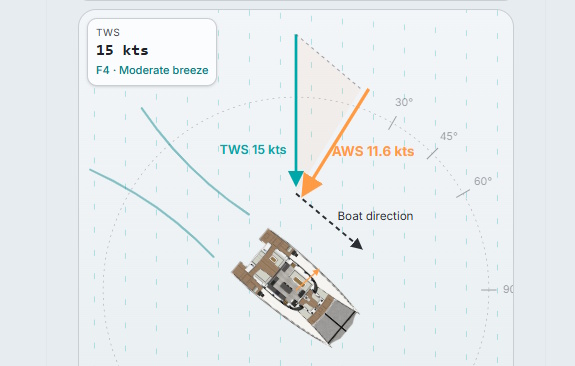
The display is a plan-view (bird’s-eye) animation of a catamaran cycling through five points of sail: close-haul (45°), close reach (60°), beam reach (90°), broad reach (130°) and dead downwind (180°). Three coloured arrows make up the vector triangle:
- Green – the true wind (TWS), always blowing from the same compass direction.
- Charcoal (dashed) the boat’s heading.
- Orange – the apparent wind (AWS / AWA), the sum of the other two. What the sails and crew feel.
Live readouts show TWA, AWA, TWS, AWS, boat speed and the Beaufort force of both winds. As the boat bears away, watch the orange arrow swing aft and shrink – the same true wind delivering a very different working breeze.
Two viewing modes
- Boat rotates: the true wind stays fixed (blowing down the page) and the boat turns through the points of sail. This matches how a chart or a wind plot is normally drawn.
- Boat stationary: the boat stays bow-up and the wind arrows rotate around it. This simulates how the world looks from your helm – the wind appears to shift as you turn.
Switch between them whichever way your brain prefers to picture it.
Manual mode
Pausing the animation unlocks three sliders: true wind angle, true wind speed and boat speed. Slide in your own numbers – a 25-knot breeze on a beam reach at 9 knots of boat speed, for example, and read off the apparent wind your sails will be working in. It’ a useful teaching aid for showing how each variable independently affects the answer.
A worked example
True wind: 15 knots. Boat speed: 7 knots (a modest cruising cat in a fresh breeze).
- Close-hauled at 45° TWA: apparent wind around 21 knots from roughly 28° – stronger and further forward than the true wind.
- Beam reach at 90° TWA: apparent wind around 17 knots from about 65°- still forward of the beam, even though the true wind is square abeam.
- Dead downwind at 180° TWA: apparent wind only 8 knots from astern – the boat is “chasing” the wind, subtracting its own speed from it.
That last example is why a downwind run in 15 knots feels calm and a beat in the same breeze feels hectic: the apparent wind nearly triples between the two.
How to use it: a quick manual
- Watch the animation
On first load the boat begins close-hauled and bears away through each point of sail in sequence, looping every 18 seconds. The orange apparent-wind arrow and the on-screen numbers update continuously. Watch how the arrow swings and changes length.
- Switch viewing mode
Use the toggle at the top of the stage to choose Boat Rotates (true wind fixed) or Boat Stationary (boat fixed, wind rotates). Pick whichever matches how you naturally picture wind on a chart or from the helm.
- Pause and explore manually
Tap the Pause button to stop the animation.
- Adjust the TWA slider to set any point of sail between 0° (head-to-wind) and 180° (dead downwind).
- Adjust TWS to model the true wind strength you expect (in knots).
- Adjust Boat Speed to match your boat’s likely speed on that point of sail.
- Read off the resulting AWA and AWS in the readout panel.
- Resume the animation
Press Play to return to the looping demo. Your TWS and Boat Speed values carry over, so you can watch the full cycle in your own chosen conditions.
- Reading the numbers
TWA / TWS – true wind angle and speed. What the forecast or anemometer-on-a-buoy would tell you.
AWA / AWS – apparent wind angle and speed. What your masthead instruments will actually show.
Boat speed – speed over the water (knots).
Beaufort – the force corresponding to each wind speed.
Notes and limitations
Boat speed in the animation varies with point of sail using a simple polar – fastest on a beam-to-broad reach, slowest dead downwind. It is not a substitute for your own boat’s polars. The model assumes flat water, no leeway and no current. Use it as a guide, not a navigational tool.